
PHP Code Compliance In Emacs
July 01, 2011 at 09:00 AM | categories: php, emacs | View CommentsMy job has me working on a project in PHP right now -- it sure isn't Python, but PHP has grown up considerably since the last time I used it, which has been awhile. Consequently, I have no Emacs config for PHP setup, other than vanilla php-mode, so I went in search of one. Of course, I knew Sacha Chua would have a great one, so that's where I've started.
My code is required to conform to the PEAR coding standards which is a bit pedantic in places, but it's generally a good reference to make clean and readable code. The only real pain in conforming to a coding standard is if your editor doesn't pick up on your mistakes right away, you get no automatic feedback and you're left with the task of cleaning up your code later at an inconvenient time. In my case, a subversion pre-commit hook checks for compliance and prevents me from checking in non-conforming code just when I thought I was ready to go home!
Sacha's configuration only checks for general syntax errors, it doesn't check for code compliance. For that, I'm using PHP_CodeSniffer which performs a static analysis of a PHP file and notes any deviations for a given standard. They even support Emacs compile mode out of the box. Compile mode still doesn't give me automatic feedback though, for that I still wanted to use flymake like Sacha has.
So here's my elisp for configuring Emacs to automatically highlight both syntax errors and coding standard deviations for PHP:
(require 'php-mode)
(require 'flymake)

;; Pear coding standards : http://pear.php.net/manual/en/standards.indenting.php
(defun pear/php-mode-init ()
  "Set some buffer-local variables."
  (setq case-fold-search t)
  (setq indent-tabs-mode nil)
  (setq fill-column 78)
  (setq c-basic-offset 4)
  (c-set-offset 'arglist-cont 0)
  (c-set-offset 'arglist-intro '+)
  (c-set-offset 'case-label 2)
  (c-set-offset 'arglist-close 0))
(add-hook 'php-mode-hook 'pear/php-mode-init)

(defun my-php-hook-function ()
  (set (make-local-variable 'compile-command) (format "php_lint %s" (buffer-file-name))))
(add-hook 'php-mode-hook 'my-php-hook-function)

(defun flymake-php-init ()
  "Use php and phpcs to check the syntax and code compliance of the current file."
  (let* ((temp (flymake-init-create-temp-buffer-copy 'flymake-create-temp-inplace))
     (local (file-relative-name temp (file-name-directory buffer-file-name))))
    (list "php_lint" (list local))))

;;This is the error format for : php -f somefile.php -l
(add-to-list 'flymake-err-line-patterns
  '("\\(Parse\\|Fatal\\) error: +\\(.*?\\) in \\(.*?\\) on line \\([0-9]+\\)$" 3 4 nil 2))

(add-to-list 'flymake-allowed-file-name-masks '("\\.php$" flymake-php-init))
(add-hook 'php-mode-hook (lambda () (flymake-mode 1)))
This depends on a small BASH helper script which I have stored in my $HOME/bin directory (which is on my PATH by default):
!/bin/bash
#This does standard PHP syntax checking
php -f $1 -l
#This does coding standard checking
phpcs --standard=PEAR --report=emacs $1
#Always exit with status code 0 otherwise flymake complains
exit 0
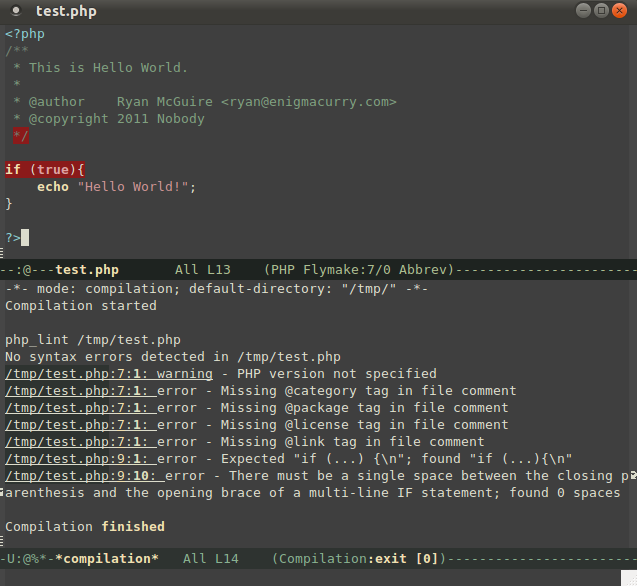
Now I get nice red highlighting for when I forget a doc tag or to put a space between parens and brackets. Isn't pedantry great? :/
AutoComplete.el : Python Code Completion in Emacs
January 21, 2009 at 10:01 PM | categories: python, emacs, linux | View Comments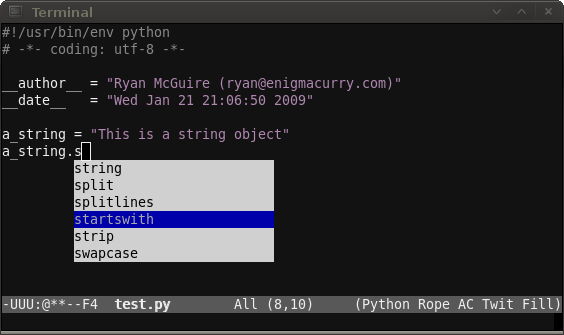
A friend of mine and I like to show off to each other little Emacs tips and tricks we learn. Today, he introduced to me the very cool AutoComplete.el package. AutoComplete.el is intriguing to me because, unlike ropemacs mode which I've blogged about before, the completions AutoComplete.el provides are inline with your code in a dropdown box instead of in a seperate window (windows in Emacs are what most people call frames). However, AutoComplete is only a completion framework, it doesn't know anything about Python. Instead, it allows the user to plug into it, feeding it whatever sorts of intelligent completion you want, including Rope.
Setup
The two most important completions I want to integrate into it are Rope and yasnippet. AutoComplete can handle both of them nicely. You'll need to install the very latest development version (as of December '08) of Rope, Ropemacs and Ropemode:
sudo apt-get install mercurial
mkdir /tmp/rope && cd /tmp/rope
hg clone http://bitbucket.org/agr/rope
hg clone http://bitbucket.org/agr/ropemacs
hg clone http://bitbucket.org/agr/ropemode
sudo easy_install rope
ln -s ../ropemode/ropemode ropemacs/
sudo easy_install ropemacs
You'll also need to install Pymacs and Yasnippet if you haven't already:
mkdir -p ~/.emacs.d/vendor && cd ~/.emacs.d/vendor
wget http://pymacs.progiciels-bpi.ca/archives/Pymacs-0.23.tar.gz
tar xfv Pymacs-0.23.tar.gz
cd Pymacs-0.23
make
sudo easy_install .
cd ~/.emacs.d/vendor
wget http://yasnippet.googlecode.com/files/yasnippet-0.5.9.tar.bz2
tar xfv yasnippet-0.5.9.tar.bz2
cd ~/.emacs.d
ln -s vendor/yasnippet-0.5.9/snippets/ .
Make sure Pymacs and Yasnippet get into your load path, in your .emacs:
(add-to-list 'load-path "~/.emacs.d/vendor")
(progn (cd "~/.emacs.d/vendor")
       (normal-top-level-add-subdirs-to-load-path))
Install AutoComplete.el 0.1.0 (0.2.0 is now out, and is not compatible with this post, I'll try and update later):
cd ~/.emacs.d/vendor
wget http://www.emacswiki.org/emacs/?action=browse;id=auto-complete.el;raw=1;revision=5
Now to add some more elisp to your .emacs somewhere:
(require 'python)
(require 'auto-complete)
(require 'yasnippet)

(autoload 'python-mode "python-mode" "Python Mode." t)
(add-to-list 'auto-mode-alist '("\\.py\\'" . python-mode))
(add-to-list 'interpreter-mode-alist '("python" . python-mode))

;; Initialize Pymacs
(autoload 'pymacs-apply "pymacs")
(autoload 'pymacs-call "pymacs")
(autoload 'pymacs-eval "pymacs" nil t)
(autoload 'pymacs-exec "pymacs" nil t)
(autoload 'pymacs-load "pymacs" nil t)
;; Initialize Rope
(pymacs-load "ropemacs" "rope-")
(setq ropemacs-enable-autoimport t)

;; Initialize Yasnippet
;Don't map TAB to yasnippet
;In fact, set it to something we'll never use because
;we'll only ever trigger it indirectly.
(setq yas/trigger-key (kbd "C-c <kp-multiply>"))
(yas/initialize)
(yas/load-directory "~/.emacs.d/snippets")


;;;;;;;;;;;;;;;;;;;;;;;;;;;;;;;;;;;;;;;;;;;;;;;;;;;;;;;;;;;;;;;;;;;;;;
;;; Auto-completion
;;;  Integrates:
;;;   1) Rope
;;;   2) Yasnippet
;;;   all with AutoComplete.el
;;;;;;;;;;;;;;;;;;;;;;;;;;;;;;;;;;;;;;;;;;;;;;;;;;;;;;;;;;;;;;;;;;;;;;
(defun prefix-list-elements (list prefix)
  (let (value)
    (nreverse
     (dolist (element list value)
      (setq value (cons (format "%s%s" prefix element) value))))))
(defvar ac-source-rope
  '((candidates
     . (lambda ()
         (prefix-list-elements (rope-completions) ac-target))))
  "Source for Rope")
(defun ac-python-find ()
  "Python `ac-find-function'."
  (require 'thingatpt)
  (let ((symbol (car-safe (bounds-of-thing-at-point 'symbol))))
    (if (null symbol)
        (if (string= "." (buffer-substring (- (point) 1) (point)))
            (point)
          nil)
      symbol)))
(defun ac-python-candidate ()
  "Python `ac-candidates-function'"
  (let (candidates)
    (dolist (source ac-sources)
      (if (symbolp source)
          (setq source (symbol-value source)))
      (let* ((ac-limit (or (cdr-safe (assq 'limit source)) ac-limit))
             (requires (cdr-safe (assq 'requires source)))
             cand)
        (if (or (null requires)
                (>= (length ac-target) requires))
            (setq cand
                  (delq nil
                        (mapcar (lambda (candidate)
                                  (propertize candidate 'source source))
                                (funcall (cdr (assq 'candidates source)))))))
        (if (and (> ac-limit 1)
                 (> (length cand) ac-limit))
            (setcdr (nthcdr (1- ac-limit) cand) nil))
        (setq candidates (append candidates cand))))
    (delete-dups candidates)))
(add-hook 'python-mode-hook
          (lambda ()
                 (auto-complete-mode 1)
                 (set (make-local-variable 'ac-sources)
                      (append ac-sources '(ac-source-rope) '(ac-source-yasnippet)))
                 (set (make-local-variable 'ac-find-function) 'ac-python-find)
                 (set (make-local-variable 'ac-candidate-function) 'ac-python-candidate)
                 (set (make-local-variable 'ac-auto-start) nil)))

;;Ryan's python specific tab completion
(defun ryan-python-tab ()
  ; Try the following:
  ; 1) Do a yasnippet expansion
  ; 2) Do a Rope code completion
  ; 3) Do an indent
  (interactive)
  (if (eql (ac-start) 0)
      (indent-for-tab-command)))

(defadvice ac-start (before advice-turn-on-auto-start activate)
  (set (make-local-variable 'ac-auto-start) t))
(defadvice ac-cleanup (after advice-turn-off-auto-start activate)
  (set (make-local-variable 'ac-auto-start) nil))

(define-key python-mode-map "\t" 'ryan-python-tab)
;;;;;;;;;;;;;;;;;;;;;;;;;;;;;;;;;;;;;;;;;;;;;;;;;;;;;;;;;;;;;;;;;;;;;;
;;; End Auto Completion
;;;;;;;;;;;;;;;;;;;;;;;;;;;;;;;;;;;;;;;;;;;;;;;;;;;;;;;;;;;;;;;;;;;;;;
Github
These changes are also applied to my Emacs environment on Github. I'm continuously trying to improve my emacs setup, so if you're reading this a few months/years after this post was made, you may want to check there for improvements.
Update Jan 30 2009: I made some modifications to the tab complete order, a regular indent is applied first before autocompletion. Autocompletion is also not applied unless you are at the end of a word. This is useful when you press Tab at the beginning of a line to indent/outdent.
Usage
Once you got everything setup, usage is real easy:
- Open up a python (.py) file
- Press TAB when you want to use code completion or to insert a snippet.
The first time you attempt to use code completion you'll be prompted to enter the root of your project directory.
Future
It wasn't too long ago when Python code completion inside Emacs was just a pipedream. So now that we have it, let's make some more pipedreams: I'd like to popup some nice contextual help for method arguments as well as python documentation for the current method/class being completed.
The possibilities are pretty much endless. I love Emacs.
256 colors on the Linux terminal
January 20, 2009 at 12:30 PM | categories: emacs, linux | View CommentsI've been using Linux as my main OS for well over a decade now. I can hardly believe I didn't pick up on this tip before.
On your linux desktop, open up your favorite terminal emulator. Enter this command:
tput colors
What number do you see? 8?
8 stinking colors. That's what my terminal is capable of displaying. It's 2009 folks, and my terminal can only display 8 stinking colors.
Load up emacs in the terminal (emacs -nw) and see for yourselves, M-x list-colors-display shows you all of the different colors your terminal can display.
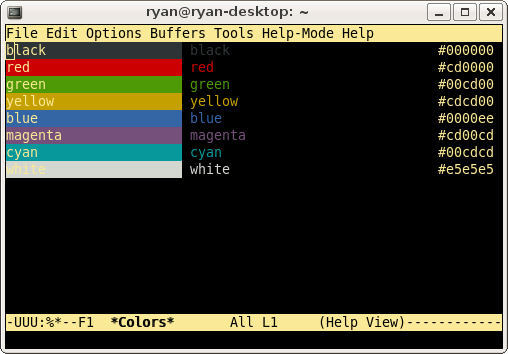
Pitiful.
Ok, so how to improve this? On ubuntu:
sudo apt-get install ncurses-term
and stick the following in your ~/.bashrc and/or ~/.bash_profile:
export TERM=xterm-256color
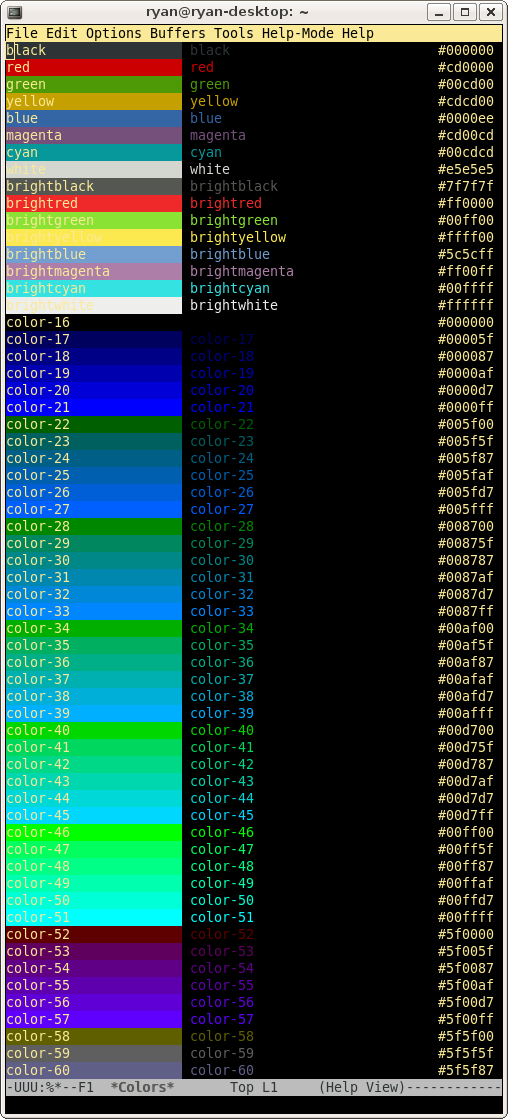
Ahhhhh...
My Emacs config on Github
January 19, 2009 at 05:01 PM | categories: python, emacs | View CommentsThe most popular post on this blog is Emacs as a powerful Python IDE. I get quite a few emails regarding that post and I realized the other day that I've done a lot of customizations to my .emacs, and subsequently that post is starting to get a little dated. Time is a curious creature, it seems like yesterday that I wrote that post, but it's been almost 9 months now.
I've been learning and playing around with git recently, so I've decided to post my entire .emacs config on github.
Here are the latest instructions for emulating my Emacs environment on Ubuntu 8.10:
- Enable the universe repository
- sudo apt-get update
- sudo apt-get install emacs-snapshot git-core automake libgconf2-dev texinfo python-setuptools
- cd ~
- git clone git://github.com/EnigmaCurry/emacs .emacs.d
- cd ~/.emacs.d
- git submodule init
- git submodule update
- cd ~/.emacs.d/vendor
- ./vendor-compile.sh
- sudo easy_install "http://downloads.sourceforge.net/rope/rope-0.9.1.tar.gz?modtime=1225268769&big_mirror=0"
- sudo easy_install "http://downloads.sourceforge.net/rope/ropemacs-0.6.tar.gz?modtime=1223039342&big_mirror=0"
I've done some reorganization of the directory structure:
- There actually is no ~/.emacs file anymore, having realized that Emacs looks for ~/.emacs.d/init.el. Convenient!
- All third party packages are now installed in ~/.emacs.d/vendor. This was a great tip I saw in the Emacs Peepcode screencast. (it's $9, but worth it).
- I've taken the suggestion that greg made in the comments to use submodules for some of the vendor packages. The vendor-compile.sh script does the compiling of those packages.
- All private code goes in ~/.emacs.private. This lets me keep passwords and such outside of the main git repository and allows me to publish my config more easily. Before I did this I had to spend time sanitizing the code before each release.
I have appreciated your many encouraging Emails and comments. :)
Extending Emacs with Advice
January 14, 2009 at 04:30 PM | categories: emacs | View CommentsThe greatest single thing about Emacs is it's extensibility. If you think Emacs is missing something, or don't like how something works, you can change it. But that's true of any open-source software. The difference with Emacs is how easy it is to make that change.
There are several different strategies to extend Emacs. I'll list a few of them in order of hardest to easiest (and arguably from worst to best):
- Write your own major or minor mode from scratch.
- Edit someone else's mode (and hopefully submit a patch.)
- Write an Advice function.
- Write a Mode Hook.
Where Advice fits in
(Don't worry, I get into the meat of it in the next section. For the impatient, skip down.)
Mode hooks are almost always the easiest and best way to extend a particular mode, but they are also limited in scope. The author of the mode created these hooks specifically to allow you to extend his mode, and are therefore the best maintainable way to extend a mode (the author is unlikely to remove those hooks in future versions). However, if the author didn't anticipate certain functionality and there is no appropriate hook provided, you'll have to come up with a different solution.
At this point, obviously, you could just write your own mode -- but what a pain that would be if you already have something that's close to what you want. So why not just edit that particular mode to suit your needs (perhaps creating that missing mode hook yourself?) This approach is probably the best one especially if the feature you want is something other people would benefit from. You can submit your changes as a patch to the original author and (if he accepts them) your changes go into the next release.
But what if for some reason your changes are not acceptable to the author? You can still use your changes on your local machine, but every time a new version of the original mode comes out you'll have to merge your changes back into that new version. At this point you've successfully "forked" the project, but that's usually a bad thing in the long run.
One other option exists to Emacs developers: advice. Advice allows you to wrap existing functions with your own functions. This allows some types of behavior to be modified without even having to change the original file at all. You can keep your changes completely separated in your own customized files. This gives you the benefit of inheriting new versions of the mode by simply downloading the new version and putting it in your load path. In most cases your advice function will continue to work on the new version and you didn't have to merge any changes at all. If significant changes have been made you may need to modify your advice function, or create a new one, but you still won't need to merge any changes.
Continue reading and I'll give you a real-world example of how I've used advice, but I want to first re-iterate the proper use cases of advice:
- If you can use the mode hooks provided by the author, use them instead.
- If there is a bug in the original mode, just fix it in the original code and submit a patch.
- If there is a new feature you want, add it to the original mode and submit a patch. Talk to the author, work with him, and it will most likely end up in the next release.
- If you are an Emacs developer, working on Emacs itself, or one of the modes shipped with Emacs, never use advice. It's the least maintainable method of extending Emacs with the exception of a pure fork, and since you're working on Emacs itself, it's not a fork.
- If your patch is not accepted, or you know that what you want is fringe enough or hackish enough to not warrant submitting a patch, only then should you use advice or fork the project.
Using Advice
Alright, onward to the example I promised. I really liked the tip over at Minor Emacs Wizardry on combining EasyPG with Org mode -- it's an awesome way to keep a lot of things in an organized and encrypted way -- I use it all the time now.
My main machine is running Ubuntu and it's default GnuPG agent is Seahorse. It's actually a pretty nice manager for encryption (SSH and PGP) and is completely integrated with the Gnome desktop. The one problem I have with it is that I use Multi-TTY Emacs and when I'm using a terminal on a remote connection and I try and open an encrypted file, Seahorse pops up on the desktop instead of prompting me for the passphrase on my remote connection. In the past I've had to fire up VNC to my desktop just so that I could enter the password; damn inconvenient.
I could setup something like keychain, it's a real nice GPG agent that works equally well on the desktop as on the console. I've used it in the past and liked it. Seahorse requires no setup though, it comes with Ubuntu by default, and like I said, I really quite like it.
So, when I'm on my remote connection and Seahorse doesn't have my password cached, I'd like to be able to bypass the GPG agent entirely and just enter my password. EasyPG doesn't appear to have this functionality so I added it with advice:
(defadvice epg--start (around advice-epg-disable-agent disable)
  "Make epg--start not able to find a gpg-agent"
  (let ((agent (getenv "GPG_AGENT_INFO")))
    (setenv "GPG_AGENT_INFO" nil)
    ad-do-it
    (setenv "GPG_AGENT_INFO" agent)))
That little bit of code wraps the main EasyPG function that will ask for a password. It temporarily removes the environment variable that EasyPG looks for to connect to the GPG agent, and therefore EasyPG asks the user for the password as if there were no agent running.
Let's analyze the different parts of that advice function:
- All advice starts with a "defadvice" definition.
- "epg--start" is the name of the original function I'm wrapping.
- "around" is indicating that I'm specifying code to run both before and after the function I'm wrapping (other options would include "before" and "after")
- The word "disable" means that the advice is initially turned off (you could say "activate" to have it immediately turned on, read the manual for more options here)
- Starting with the "let" function is the body of my custom function
- The "ad-do-it" line in the middle is the point in the function where the original function gets executed. (This would not be used in a "before" or "after" style function.)
One more important thing to understand about advising a function is that you aren't creating a new function with a new name. You are adding data to the existing function definition. Wherever the original function gets called, your advice will be called along with it. However, advice does offer the convenience of turning on or off your changes. For the above example I added two user commands to turn on and off the GPG agent (bound to M-x epg-disable-agent and M-x epg-enable-agent):
(defun epg-disable-agent ()
  "Make EasyPG bypass any gpg-agent"
  (interactive)
  (ad-enable-advice 'epg--start 'around 'advice-epg-disable-agent)
  (ad-activate 'epg--start)
  (message "EasyPG gpg-agent bypassed"))

(defun epg-enable-agent ()
  "Make EasyPG use a gpg-agent after having been disabled with epg-disable-agent"
  (interactive)
  (ad-disable-advice 'epg--start 'around 'advice-epg-disable-agent)
  (ad-activate 'epg--start)
  (message "EasyPG gpg-agent re-enabled"))
These functions use the (ad-enable-advice) and (ad-disable-advice) functions respectively. Whenever advice is switched on or off, a call to (ad-activate) must also be made on the function to update it.
The manual goes into more depth about how to advice functions. Hopefully you got something useful out of this, I sure learned a lot in writing it.
Next Page »
Contact me
Friends
- brainjack>>
- Duane McGuire - My Dad
- Erin McGuire - My Sister
- Heavy Noir
- OneWatt
- Six Mile Village

Liberty Links
Categories
- android (rss) (1)
- backups (rss) (1)
- blogofile (rss) (1)
- car computer (rss) (1)
- cats (rss) (1)
- class work (rss) (1)
- cool stuff (rss) (9)
- curlbomb (rss) (1)
- diy (rss) (1)
- economics (rss) (2)
- electronics (rss) (1)
- emacs (rss) (13)
- enigma curry (rss) (8)
- enigmacurry.com (rss) (1)
- free state project (rss) (3)
- games (rss) (1)
- geek humor (rss) (3)
- geeky (rss) (2)
- gmail (rss) (1)
- gnome (rss) (1)
- hd-dvd (rss) (2)
- humor (rss) (2)
- java (rss) (3)
- letters (rss) (2)
- liberty rants (rss) (42)
- linux (rss) (20)
- lisp (rss) (1)
- michael badnarik (rss) (2)
- mitt romney (rss) (3)
- music (rss) (1)
- n800 (rss) (1)
- openoffice.org (rss) (1)
- php (rss) (1)
- pissed off (rss) (3)
- python (rss) (31)
- ron paul (rss) (9)
- security (rss) (5)
- software (rss) (1)
- stupidity (rss) (4)
- uncategorized (rss) (6)
- videos (rss) (9)
Archives
- May 2016 (1)
- July 2011 (1)
- September 2010 (1)
- July 2010 (2)
- April 2010 (1)
- January 2010 (1)
- December 2009 (1)
- July 2009 (1)
- May 2009 (2)
- March 2009 (1)
- January 2009 (4)
- December 2008 (3)
- November 2008 (2)
- October 2008 (1)
- September 2008 (1)
- August 2008 (3)
- July 2008 (1)
- May 2008 (2)
- April 2008 (2)
- March 2008 (1)
- February 2008 (2)
- January 2008 (1)
- December 2007 (1)
- November 2007 (5)
- October 2007 (7)
- September 2007 (3)
- July 2007 (3)
- June 2007 (3)
- May 2007 (3)
- April 2007 (3)
- February 2007 (2)
- November 2006 (1)
- October 2006 (3)
- July 2006 (1)
- June 2006 (1)
- May 2006 (2)
- April 2006 (10)
- February 2006 (2)
- January 2006 (6)
- December 2005 (1)
- November 2005 (5)
- October 2005 (3)
- September 2005 (2)
- August 2005 (5)
- July 2005 (1)
- June 2005 (2)
- May 2005 (7)