
New Slacker Screenlet released
April 04, 2008 at 10:43 PM | categories: python, linux | View CommentsCheck it out: I updated my Slacker Screenlet today.
New in this version:
- Bug fixed where the screenlet-manager would respawn infinitely
- Integrated LastSlacker support
You can read more about the original version in my previous post.
LastSlacker is a way to scrobble what you listen to on Last.FM. This lets you share a log of what you listen to with friends. I've been meaning to add this feature for a long time now, until today it's been in a sorta working state for months! It feels good to have finally gotten this project pretty much finished.
Last.FM at 75MPH
March 04, 2008 at 11:33 PM | categories: geeky, cool stuff, n800 | View CommentsI got a new phone today, a Samsung A737 from ATT. I signed up for their media net unlimited for an additional $15 and it gives me internet access, not only on my phone, but on my N800 too.
I have the Vagalume Last.FM client installed on my N800, and guess what? The 3G connection is sufficient for streaming! :)
I tested it out today, only a 5 mile trip on I-15 (SLC metro area). At 75 MPH, I went through about 3 songs. I advanced (skipped) the song about 5 times, and each time it went to the next song very rapidly (1-2 seconds delay). The whole time the music only cut out once when I first got onto the freeway, but only for about 2 seconds and it corrected itself.
I am extremely giddy at all the geeky prospects that lie ahead for me :)
Backing up my (online) brain
February 22, 2008 at 11:22 PM | categories: backups, gmail, linux | View CommentsFiles from my computer are disappearing.
No worries though, this is intentional.
As time goes on, more and more of my files are ending up in places like:
- Flickr
- Del.icio.us
And things are great. I can access these services from anywhere in the world, from any computer. What a great time to be alive!
But there is a bit of uneasiness in the back of my mind about all of this. Yes, these services liberate me (as well as my data), but at the same time, I've become a new breed of slave -- my data is no longer mine to control.
Privacy concerns aside, the biggest thing that haunts me is what if one of these services were to blow up? My data would be gone. When the data resided on my computer I could back it up myself anytime I wanted and have some sense of safety. With data on Google's server, honestly I feel pretty darn safe, but the cost of losing my data is still quite high.
My goal: Get my data back into my hands.
I'd like to start writing up my experiences on wrangling all of my data from my online services back onto media I control.
If you want to follow along, I'll be tagging these posts 'Backups'.
Gmail
The first service I'll start with is Gmail. Google, in the realm of free mail hosts, is very accommodating when it comes to accessing your mail in bulk. They have both POP3 and IMAP access. Retrieving your mail with any number of clients is trivial.
But there's more to Gmail than just your email: tags. POP3 won't get the tags, but IMAP will organize tags into folders. However, most IMAP clients only download messages on-the-fly as you read them, not all at once (like for backups).
Solution: OfflineIMAP.
OfflineIMAP will completely download all your Gmail messages into folders corresponding to all your tags. It actually does much more than this, OfflineIMAP is a full two-way synchronization of your email. Once you've downloaded your email you can take it with you while you're offline, read it, delete it and when you come back online you synchronize with gmail again deleting those same messages off of the server and retrieving new messages.
OfflineIMAP works really well for it's stated purpose: using IMAP offline. It is also useful for backing up IMAP accounts but you have to understand how it works so that you don't accidentally start deleting mail from your gmail account. Since we're using OfflineIMAP as a backup device instead of a tool to read our email I would recommend that you never open the email that it downloads with any sort of mail reader. If you do, and you accidentally move messages to a different location (mutt does this to read messages for instance), OfflineIMAP might think you deleted the message and it will delete the same message off your server (In Gmail's case it actually just removes the tag and keeps the message in All Mail, but still..) If you ever need to use the downloaded email, its safer to use a copy instead.
Caveat Emptor. Onward to configuring OfflineIMAP.
On Ubuntu:sudo apt-get install offlineimap
Create a file called ~/.offlineimaprc :
[general]
accounts = GMail
maxsyncaccounts = 3

[Account GMail]
localrepository = Local
remoterepository = Remote

[Repository Local]
type = Maildir
localfolders = /storage/Gmail_Backup

[Repository Remote]
type = IMAP
remotehost = imap.gmail.com
remoteuser = your_username@gmail.com
remotepass = your_password
ssl = yes
maxconnections = 1

#Setting realdelete = yes will Really Delete email from the server.
#Otherwise "deleting" a message will just remove any labels and
#retain the message in the All Mail folder.
realdelete = no
The things you need to change are:
- localfolders - This is the full path to where it will save the email
- remoteuser - This is your gmail email address
- remotepass - This is your gmail password (required for automated backups, otherwise it asks everytime)
You can now run offlineimap and you should start to see it download your email. By default, OfflineIMAP gives you a graphical or textual interface that shows you what it is doing. This is good especially for the first time you download your email.
After you've downloaded all of your email, you'll want to automate the task so it runs at least every day:
Put the following in your crontab:
00 23 * * * offlineimap -u Noninteractive.Quiet
This will run OfflineIMAP everyday at 11PM.
Again, because OfflineIMAP is not technically a backup solution in itself, you might also care to make a seperate rsyncd copy of the mail somewhere else:
rsync -a /storage/Gmail_Backup/ /storage/Gmail_Backup_Copy
You can similarly run rsync in your crontab after your offlineimap finishes. By making this seperate copy, you avoid the possible deletion of emails by OfflineIMAP. This second copy will also retain messages that you delete later on in Gmail (The offlineimap syncd copy will not). This may or may not be what you want.
Stay tuned for the next installment: Flickr backups!
Automated Time Lapse Photography in Python
February 14, 2008 at 11:32 PM | categories: python | View CommentsLast night at the Utah Python User Group meeting, John Harrison had an awesome game he has made called Marshie Attacks. It combines PyGame, PySight, a projector and lasers. You point the laser at Marshie and the isight camera detects if the laser is on target, and if so, he blows up. Very cool stuff indeed.
His game depends on the Macintosh PySight library for video capture, but is otherwise cross platform. I decided to take a stab at getting images off my webcam in linux. Using gstreamer, it wasn't hard at all.
I don't have a projector, so I can't make a full Linux port Marshie Attacks, yet. This first stab is just to show how to grab images from a v4l2 device in Linux. This program takes time lapse photos, and saves them to disk with a configurable frequency.
Requirements include:- Python (2.5)
- gstreamer 0.10
- Python Imaging Library
Ron Paul on the Dollar, Gold, and Oil
January 09, 2008 at 01:03 AM | categories: python, ron paul, economics, liberty rants | View CommentsEveryone that drives a car knows that gasoline has gotten a lot more expensive over the last few years. But very few people seem to correctly understand why this is. Ron Paul, in his latest debate appearance, laid it out quite plainly, but it takes keen and willing ears to fully appreciate it:
The value of oil hasn't changed at all -- instead, the value of our dollar has tanked. The value of oil, relative to gold, has sat unchanged since 2000 (and even well before that). This means that if you got your paycheck in gold instead of dollars you'd still be paying the same price for gas as you were a decade ago.
The gas prices are not the fault of greedy capitalists. No gas company is "gouging" you. On the contrary, seemingly high gas prices are not due to any free market force at all, but rather due to the fascist cooperation of a complacent, apathetic, congress and the Federal Reserve. Our government has an insatiable appetite to print money out of thin air to support a massive military industrial complex as well as a socialist, redistributionist, welfare state. This monstrously inflates the money supply -- robbing the value of your dollar.
I decided to prove this for myself, that the golden price of oil is relatively stable. I downloaded historical gold spot prices, as well as historical crude oil prices. Using a bit of Python and matplotlib, I produced the following graph:
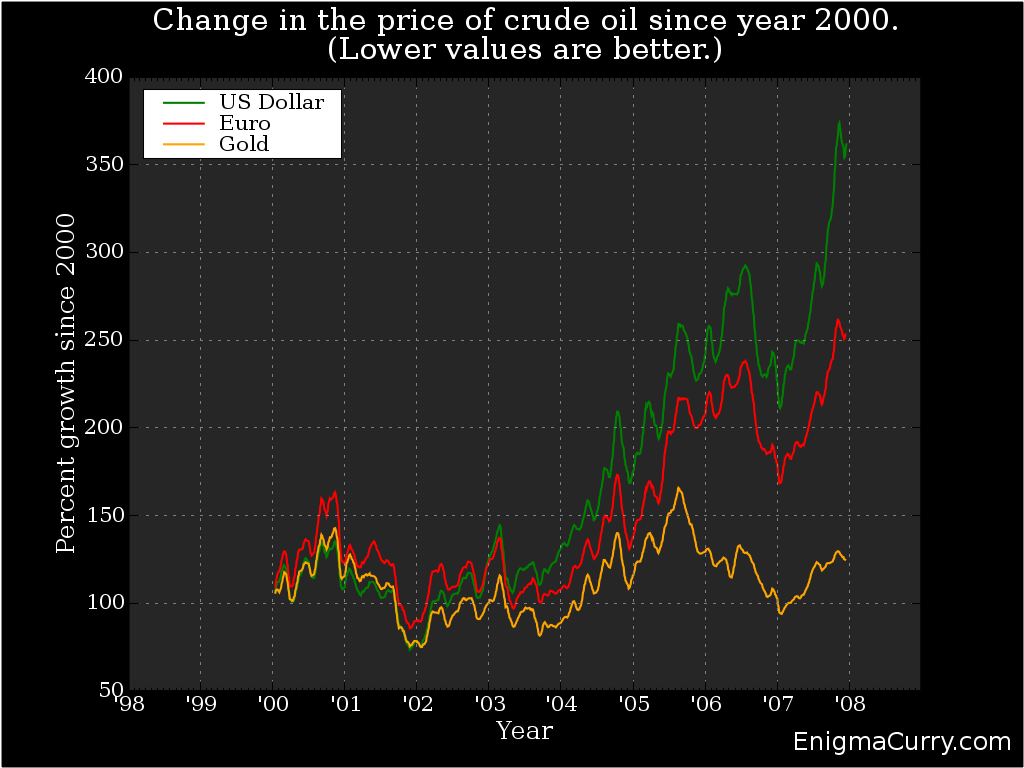
I'm not an economist, so I was fairly pleased when I saw that what I came up with correlated fairly well with the graph that the Wall Street Journal published. This graph shows that oil costs 3.5 times as many dollars as it did in 2000, and yet the oil price in gold has barely changed at all in the past eight years.

Everyone should be putting their money into an account with interest of some kind, and not just letting their money sit around uninvested. But at the rate that the dollar is losing its value, even "high" interest investments aren't paying out faster than the current rate of inflation (and as the above graph shows, that inflation is a lot more than the 3% the government would tell you). If we simply legalized alternative, market based currencies (as opposed to raiding and plundering them), we could have much larger gains on our investments as well as not losing any value on any money left uninvested.
This issue has been the core of Dr. Paul's career since the 1960's. It has taken the American people a very long time to wake up to this issue, and so it is an immense credit to his character that he has shown an undying vigilance, these many years, to the pursuit of liberty. I too, have hope for America.
(If anyone is interested, here is the python code (as well as the data files) used for the graph. )
« Previous Page -- Next Page »
Contact me
Friends
- brainjack>>
- Duane McGuire - My Dad
- Erin McGuire - My Sister
- Heavy Noir
- OneWatt
- Six Mile Village

Liberty Links
Categories
- android (rss) (1)
- backups (rss) (1)
- blogofile (rss) (1)
- car computer (rss) (1)
- cats (rss) (1)
- class work (rss) (1)
- cool stuff (rss) (9)
- curlbomb (rss) (1)
- diy (rss) (1)
- economics (rss) (2)
- electronics (rss) (1)
- emacs (rss) (13)
- enigma curry (rss) (8)
- enigmacurry.com (rss) (1)
- free state project (rss) (3)
- games (rss) (1)
- geek humor (rss) (3)
- geeky (rss) (2)
- gmail (rss) (1)
- gnome (rss) (1)
- hd-dvd (rss) (2)
- humor (rss) (2)
- java (rss) (3)
- letters (rss) (2)
- liberty rants (rss) (42)
- linux (rss) (20)
- lisp (rss) (1)
- michael badnarik (rss) (2)
- mitt romney (rss) (3)
- music (rss) (1)
- n800 (rss) (1)
- openoffice.org (rss) (1)
- php (rss) (1)
- pissed off (rss) (3)
- python (rss) (31)
- ron paul (rss) (9)
- security (rss) (5)
- software (rss) (1)
- stupidity (rss) (4)
- uncategorized (rss) (6)
- videos (rss) (9)
Archives
- May 2016 (1)
- July 2011 (1)
- September 2010 (1)
- July 2010 (2)
- April 2010 (1)
- January 2010 (1)
- December 2009 (1)
- July 2009 (1)
- May 2009 (2)
- March 2009 (1)
- January 2009 (4)
- December 2008 (3)
- November 2008 (2)
- October 2008 (1)
- September 2008 (1)
- August 2008 (3)
- July 2008 (1)
- May 2008 (2)
- April 2008 (2)
- March 2008 (1)
- February 2008 (2)
- January 2008 (1)
- December 2007 (1)
- November 2007 (5)
- October 2007 (7)
- September 2007 (3)
- July 2007 (3)
- June 2007 (3)
- May 2007 (3)
- April 2007 (3)
- February 2007 (2)
- November 2006 (1)
- October 2006 (3)
- July 2006 (1)
- June 2006 (1)
- May 2006 (2)
- April 2006 (10)
- February 2006 (2)
- January 2006 (6)
- December 2005 (1)
- November 2005 (5)
- October 2005 (3)
- September 2005 (2)
- August 2005 (5)
- July 2005 (1)
- June 2005 (2)
- May 2005 (7)